
In brief
The context : Odoo now supports all its older versions, but charges a 25% surcharge on the annual Enterprise subscription of databases that no longer run on one of the three latest major versions. Since Odoo 20 came out in September 2026, V17 is the next version affected.
What this article covers : the surcharge timeline for V17, the limits of multi-year contracts, the expiry date of versions on Odoo.sh, how to calculate the break-even point of an upgrade, the ideal upgrade frequency and the chance to clear out custom code.
The key takeaway : paying the surcharge over time means funding the status quo. In most cases, that budget is better spent on an upgrade back to standard, after an audit of your database.
Carrot and stick : why V17 is in the firing line
What has changed. Until July 2025, Odoo only supported the three latest versions. If you were on an older version, you were on your own. Unless you were working with an Odoo Partner like Niboo, for example.
Odoo now offers technical support and bug fixes on all its older versions. Security updates, however, remain limited to the first three years of each version, according to Odoo's official documentation.
The carrot : your standard ERP stays maintained, even on a version that is several years old.
The stick : this peace of mind costs you an automatic 25% surcharge.
The V17 timeline : tick-tock…
Odoo's rule is simple : the surcharge applies as soon as a version drops out of the three latest major versions (calculated 6 months after the release of the new major version).
In September 2026, Odoo launched V20. The three versions covered at the normal price are now V20, V19 and V18.
V17 has officially moved into the “Legacy” category.
In spring 2027 (6 months after the release of V20), the 25% surcharge will start to hit every database still on V17.
Does a multi-year contract protect you from the surcharge ?
No : a multi-year contract is only a reprieve, a false shield. Some companies think they are protected by a 3 or 5 year contract signed before the new price lists of July 2025.
Let's be clear : even if you have an old contract running, you will have to switch to the new rules at your next renewal.
Why ? Because to keep using Odoo, you have to sign the new terms and conditions. If you refuse these rules (and therefore the 25% surcharge for your obsolete version), you will simply have to leave Odoo. Sooner or later, the surcharge will catch up with you.
That said, Odoo does everything it can to make moving from one version to the next easier : the upgrade of your data is handled by Odoo and included in your licences ! Only your custom code stands in the way because it has to be upgraded technically, usually by your Odoo Partner.
Odoo.sh : hosting has an expiry date too
On Odoo.sh, a version that is too old ends up blocked, even if you agree to pay the surcharge. Does paying the 25% to keep your old version sound acceptable ? Be careful : the software is not the only thing with an expiry date. Hosting has one too.
If you use Odoo.sh, Odoo's cloud platform, you are subject to a strict 6-year lifecycle. After that, Odoo cuts your version off from its servers.
A concrete example :
Odoo V14 has been permanently blocked on Odoo.sh since 31 October 2026, after the release of V20.
The impact :
Since that date, even if you agree to pay the 25% penalty, your database is blocked in production on Odoo.sh. Only two options remain : upgrade your version in a rush, or leave Odoo's cloud and reinstall your old system on your own servers (on-premise), at your own cost.
Finally, it is not unusual for an upgrade to let us remove all the custom code that was needed until now. You then move from paid hosting, required when you need to code (Odoo.sh), to hosting included in the licence price, because you are back to full standard (Odoo SaaS) ! Another potential gain from upgrading.
Stay or upgrade : how to calculate your break-even point
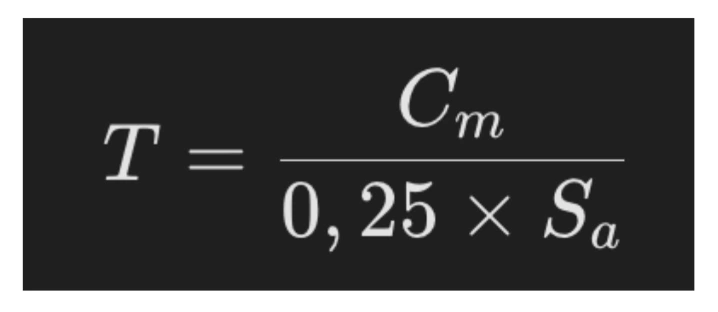
To make a rational decision, you need to calculate your break-even point. The formula to find out how many years it takes for your upgrade to pay for itself is:
In text form : T = Cm / (0.25 × Sa), where :
T is the time needed for the upgrade to pay for itself (in years);
Cm is the cost of your upgrade (audit, testing, code rewriting by your partner);
Sa is the cost of your annual Odoo Enterprise subscription.
A word of caution : This break-even calculation is specific to each project : there is no single compass. Every company carries its own history, with custom code that was needed at the time and has sometimes become completely outdated or useless today, simply because the standard of the recent version handles it natively.
How often should you upgrade Odoo ?
Ideally, aim for an upgrade every 2 years. As the architect of your ERP, the question always comes up: how often should this big leap be planned ?
The recommended pace :
An upgrade every 2 years (for example, moving from V17 to V19). It is the perfect sweet spot to benefit from the vendor's major innovations without the technical step and the teams' adaptation effort becoming too steep.
For risk-takers :
Every 3 years, if you like cutting it fine (just-in-time). Beyond 3 versions apart, the increase in technical cost is no longer linear : it becomes exponential, because Odoo's underlying data models and frameworks change deeply.
Clearing out custom code : the real gain of an upgrade
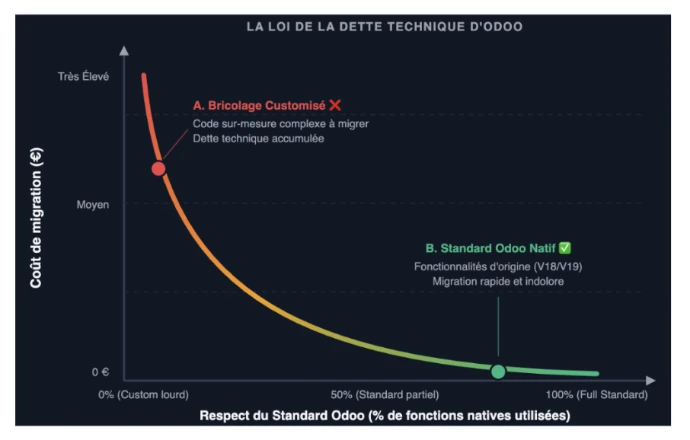
An upgrade is the chance to replace custom code with features that have become standard. The main reason companies hesitate to upgrade is the fear of having to reinstall specific (custom) code. Yet it is the best opportunity this transition offers.
Each new version of Odoo natively includes features that required heavy development two or three years ago (such as AI invoice scanning, advanced budgeting tools or complex planning). Upgrading is the chance for a big clean-up :
Eliminate technical debt : you remove custom code and replace it with Odoo's standard.
Lower infrastructure costs : fewer lines of specific code means a faster, lighter system, and therefore lower maintenance costs.
Painless future upgrades : the closer you get to the standard, the simpler, faster and cheaper your future upgrades will be.
Frequently asked questions
It is the 25% surcharge Odoo applies to the price of your annual Enterprise subscription if your database runs on a version that is no longer one of the three latest major versions. In return, Odoo keeps providing technical support for that version.
V17 left the trio of covered versions when V20 was launched in September 2026. The surcharge will start to apply in spring 2027, 6 months after the release of V20.
Odoo cuts that version off from its servers, even if you pay the surcharge : V14 has been blocked since 31 October 2026. You then have to upgrade in a rush or reinstall the old system on your own servers, at your own cost.
We recommend an upgrade every 2 years, for example from V17 to V19. Every 3 years is possible if you like cutting it fine, but beyond 3 versions apart, the technical cost becomes exponential.
Conclusion : don't suffer the surcharge, plan for it
Paying Odoo's 25% surcharge in the long run is a dead financial loss that brings you no added value. It is money burned to maintain the status quo. The right strategy is usually to use this budget to fund an upgrade back to standard.
There are few cases where it makes more sense to stay on your current version than to upgrade. We are thinking in particular of projects that are 100% custom : Odoo was used as a technology base to build a tool, but nothing native is used. In that case, upgrading can indeed be a risk rather than a gain.
Don't wait for spring 2027 and Odoo's extra invoice to think about it.
At Niboo, we believe digitalisation should drive efficiency, not financial penalties. More than 160 companies have already put their trust in us for their Odoo project. Our teams are here to audit your current database, identify the custom code that can be dropped in favour of new features, and plan a smooth transition.
 .