In brief
Peppol is the new electronic invoicing standard being progressively imposed across Europe, and Belgium is among the first states to require it (official activation date: January 2026).
Odoo is ready : native integration has existed since version 17, and the feature has been backported to version 16. For versions prior to V16, you need to migrate.
The pitfall : activation takes a few clicks, but the default sending method of contacts ("Email & Electronic invoicing") causes a double send, PDF by email and XML via Peppol. To move to pure Peppol, each contact record must be updated, manually, by import or by script.
I. The context : Peppol, the mandatory passage
Peppol is the new electronic invoicing standard being progressively imposed across Europe. Belgium is among the first states to require it.
Official date to activate it: January 2026. By now, you should have seen the information go by at least once !
Odoo is ready !
Good news : Odoo is ready. Version 17 introduced native Peppol integration, and since then, everything is (almost) automatic. Given that V19 has been released, those who use it got there in time to meet this legal obligation !
The promise is simple :
Send and receive electronic invoices directly from Odoo, without PDFs, without emails, without data-entry errors.
The backport to version 16 :
And the icing on the cake : Odoo has confirmed the backport of the feature to version 16 (initially planned for the end of 2025. They were quick, well done Odoo).
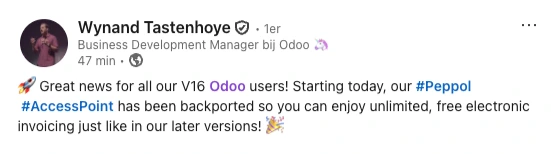
In other words : even companies not yet migrated to V17, V18 or V19 will soon be able to benefit from it. This may even allow them to postpone migrating their Odoo to a more recent version.
For versions prior to V16, there is unfortunately no alternative but to migrate. Sorry.
Our verdict :
Odoo has handled the substance, but there remains a "field" subtlety that turns a smooth migration into a real administrative headache. Let's take stock, without mincing words.
II. Activation: easy peasy lemon squeezy
Activating Peppol is (really) simple. All you need to do is tick a box in the invoicing settings, enter your company number, as well as an email and a phone number (to allow authentication), and Odoo takes care of the rest :
Synchronisation of invoice journals.
Compliance with Belgian legislation.
Direct receipt of electronic invoices from suppliers registered on Peppol.
Automatic sending via the Peppol network.
This is digitalisation as we like it : smooth, invisible, efficient.
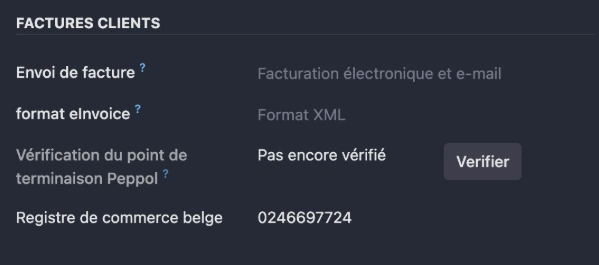
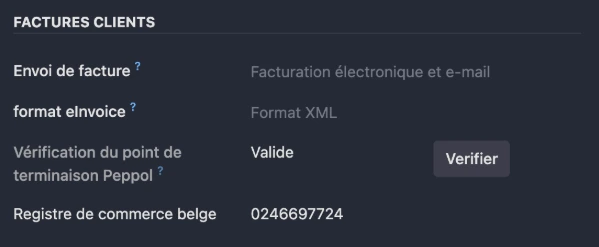
Once created, the verification still to be done.
IV. The plan Bs to fix all this
Don't panic : several options exist to put things right, depending on the size of your database and your technical comfort level.
1. Craftsman method (but reliable) :
Open each contact, tick "by Peppol", save. Perfect for a base of 20-30 suppliers. Tedious beyond that.
2. Semi-automatic method: export then import :
Export your partners (via the Contacts module), add the fields peppol_eas / peppol_endpoint / invoice_edi_format / invoice_sending_method to your export file and don't forget to tick "I want to update data (import-compatible export)" in your export pop-up. Edit the said columns as you see fit, according to the needs of each contact, then re-import.
Warning : you must respect the exact structure of Odoo's columns. An omission or a wrong case in the field name, and the import fails.
3. Pro method : the little magic script :
For databases of several hundred (or even thousands) of contacts, the most effective solution remains a Python script. In a single command, everything is aligned, cleanly and without risk.
A little reminder: Niboo can of course assist you with this kind of intervention, whether for the script or for post-activation verification.
III. The catch : a general activation, but a case-by-case adaptation still to be done
This is where the shoe pinches. You do not yet have the ability to tell Odoo a default sending method, whether for existing contacts or for those you will create in the future.
The field observation (that hurts)
When you activate Peppol, Odoo does register your company on the network. On the contacts side, Odoo uses their VAT number to fill in the Peppol identification field (the Endpoint). This is the minimum behaviour, and that's fine. From there, Odoo connects to Peppol several times a day to check the Endpoint and confirm that your contact is indeed registered and a user of the Peppol platform, so as to send them invoices this way in the future, or not.
But here is the grey area, for all contacts (existing and new). Odoo enables two critical settings by default on the contact record :
The invoice sending method (default: Email & Electronic invoicing. The other choices being by Email, by Post, by Peppol Only).
The sending format (default: XML, to be refined depending on the country : Peppol BIS 3.0, France, Germany, UBL, etc.).
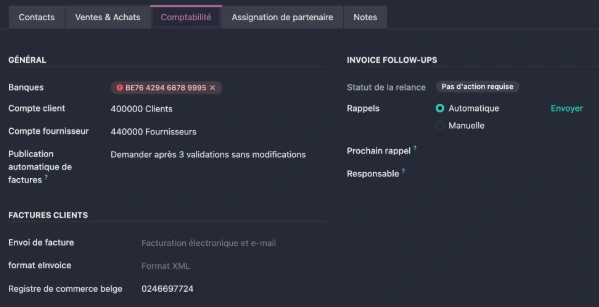
This means you have to go manually to your customers' contact records, Accounting tab, to switch the sending method to "Peppol Only" and select the desired format (in our Belgian case, European Standard Peppol BIS 3.0).
The truth about the double send
If you do not change this preferred sending method, the contact will keep the default mode (Email & Electronic invoicing). The default mode is the one shown on screen in slightly transparent grey.
Odoo sends the email with the PDF attached.
Odoo sends the XML invoice electronically via Peppol.
It is technically compliant, but you are sending twice (PDF for the human, XML for the machine), which is not the goal of a purely electronic automation. If you want your contacts to move to pure Peppol (without PDF or email), updating their contact record is mandatory.
If you have ticked both respective boxes on the pop-up for sending the invoice by email, your contact will then see both invoices in their system, and that's where the Athenians came to blows. Or the Romans came to grips.
A little tip : speeding up the verification of a contact
If you want to speed up the verification of a contact's registration on Peppol, you can switch to developer mode (Debug mode) and click the "Verify" button that will appear.
Frequently asked questions ?
Peppol is the new electronic invoicing standard being progressively imposed across Europe, and Belgium is among the first states to require it. The official activation date is January 2026.
Version 17 introduced native Peppol integration, and the feature has been backported to version 16 (announced by Odoo as free and unlimited). For versions prior to V16, there is no alternative but to migrate.
All you need to do is tick a box in the invoicing settings and enter your company number, an email and a phone number (for authentication). Odoo then takes care of sending and receiving via the Peppol network.
By default, contacts' sending method is "Email & Electronic invoicing" : Odoo sends an email with the PDF and the XML invoice via Peppol. To send only the Peppol invoice, you must switch the sending method to "Peppol Only" on the contact record (Accounting tab).
Three methods exist depending on the size of your database: manual editing record by record (20-30 contacts), export then import with the fields peppol_eas, peppol_endpoint, invoice_edi_format and invoice_sending_method, or a Python script for several hundred or thousands of contacts.
Odoo checks your contacts' Endpoint several times a day. To speed up the verification, enable developer mode (Debug mode) and click the "Verify" button on the contact record.
Conclusion
Odoo is ready for Peppol, and activating it takes only a few clicks. The real work lies in your contact records : until each one is switched to "Peppol Only", your contacts keep receiving both the PDF by email and the XML invoice via Peppol. Depending on the size of your database, you can fix this by hand, by import or by script.
And if you need a hand, Niboo can assist you, whether for the script or for the post-activation verification.
Feel free to check out our latest updates on our social media channels :
 .
.